22 May 2019
11 Nov 2018
Material de Repaso 1ª Evaluacion 1º de la ESO
Informática, Hardware, Software & Tipos de Computadoras
Componentes y Periféricos de un Ordenador
Sistemas Operativos
Unidades de Medida de la Información
16 Jul 2017
Videogame Making - Summer School Workshop
Finally all your videogames have been uploaded to Kongregate!
Click the link below and have fun!
>>>>> http://www.kongregate.com/games/lionel_ict <<<<<
2 May 2017
Programming 2016-2017
Year 1 Sonia https://studio.code.org/sections/CNBRFB
Year 1 Viky https://studio.code.org/sections/QKHVXX
Year 2 Susan Cahalin https://studio.code.org/sections/DPYKSH
Year 2 Susana Bou https://studio.code.org/sections/VGHDQG
Year 3 Alex https://studio.code.org/sections/FTYRGD
Year 3 Mario https://studio.code.org/sections/KPSYQQ
Year 4 Jackie https://studio.code.org/sections/LYMKVV
Year 4 Julia https://studio.code.org/sections/JDNBDR
Year 5 Edmar https://studio.code.org/sections/PTCLNN
Year 5 Sarah https://studio.code.org/sections/NWCQLJ
Year 6 Dennis https://studio.code.org/sections/KBMCYP
Year 6 Nicci https://studio.code.org/sections/FVMRNJ
Year 6 Helen & Paco https://studio.code.org/sections/JBSPQR
KTurtle Programming (Year 9)
Programming Refference Guide
Instructions to Install KTurtle at Home
EXERCISES
EXERCISES SOLVED
KTurtle Programming (Year 9)
Programming Refference Guide
Instructions to Install KTurtle at Home
EXERCISES
EXERCISES SOLVED
30 Jan 2017
Video Editing Project
Main Task:
The goal is to combine images or photographs and music to create your own video. Yo can also add a few Transitions and Effects as well as text if it makes sense. You only have a few lessons so don't try anything too complicated. With a video of around 30 to 60 seconds should be enough. You can do more if you wish but quality is more important than quantity.
Steps:
1. Watch the video examples below and others from Internet for ideas and Inspiration.
2. Decide what type of video you want to do and the topic.
3. Plan it! Write a short script describing your video step by step.
4. Gather all the resources you need: download images/music, take photos, record audio, etc.
Put it all in your pen drive in a new folder inside your "Video Editing" folder.
5. Use OpenShot to create the video!
---------------------------------------------------------
Improvements:
* Use your own photographs (phone or camera)
* Record your own voice (phone or Audacity)
Useful Links:
* OpenShot official website: http://openshot.org
* How to Install OpenShot on Windows: https://www.youtube.com/watch?v=zK6k7eq7ydM
* How to Install applications in Mac: https://www.youtube.com/watch?v=xrNcLf561XA
* Youtube to MP3 converter (music): http://www.youtube-mp3.org
* Youtube to MP4 converter (video): http://youtubeinmp4.com
---------------------------------------------------------
Bellow you have examples of different short videos. Some of them are simple, others more advancedand too difficult for you. Look at them and have fun!
Time Lapse How To & Examples:
https://www.youtube.com/watch?v=JQFL7z7IqUI
https://www.youtube.com/watch?v=f4up5__mNpk
https://www.youtube.com/watch?v=8b9FVkXhlDE (Mr L)
Book Trailer Examples:
http://www.schooltube.com/organization/187369/
https://www.youtube.com/watch?v=guE1YPGuMHQ
https://www.youtube.com/watch?v=cP5FQPGyAJA
https://vimeo.com/7201256
Motivational Video Example:
https://www.youtube.com/watch?v=he7BN1ZyqM8
Fake Subtitles Example:
Search "Falldown Hitler Parody" in Google for lots of examples
Stop Motion Examples:
https://www.youtube.com/watch?v=vYfqZAvn3cM
https://www.youtube.com/watch?v=BCtoxM77jLo
https://www.youtube.com/watch?v=9NZ11Hh4LP4
https://www.youtube.com/watch?v=Vb3fhmKLcu4
https://www.youtube.com/watch?v=p5QTBGVbK4Q
https://www.youtube.com/watch?v=3DFzjP6PbnU
https://www.youtube.com/watch?v=4XDMC_JzJ6Q (Mr L)
https://www.youtube.com/watch?v=esmjoXzQltE&t=80 (Mr L)
Other Ideas:
The goal is to combine images or photographs and music to create your own video. Yo can also add a few Transitions and Effects as well as text if it makes sense. You only have a few lessons so don't try anything too complicated. With a video of around 30 to 60 seconds should be enough. You can do more if you wish but quality is more important than quantity.
Steps:
1. Watch the video examples below and others from Internet for ideas and Inspiration.
2. Decide what type of video you want to do and the topic.
3. Plan it! Write a short script describing your video step by step.
4. Gather all the resources you need: download images/music, take photos, record audio, etc.
Put it all in your pen drive in a new folder inside your "Video Editing" folder.
5. Use OpenShot to create the video!
---------------------------------------------------------
Improvements:
* Use your own photographs (phone or camera)
* Record your own voice (phone or Audacity)
Useful Links:
* OpenShot official website: http://openshot.org
* How to Install OpenShot on Windows: https://www.youtube.com/watch?v=zK6k7eq7ydM
* How to Install applications in Mac: https://www.youtube.com/watch?v=xrNcLf561XA
* Youtube to MP3 converter (music): http://www.youtube-mp3.org
* Youtube to MP4 converter (video): http://youtubeinmp4.com
---------------------------------------------------------
Bellow you have examples of different short videos. Some of them are simple, others more advanced
Time Lapse How To & Examples:
https://www.youtube.com/watch?v=JQFL7z7IqUI
https://www.youtube.com/watch?v=f4up5__mNpk
https://www.youtube.com/watch?v=8b9FVkXhlDE (Mr L)
Book Trailer Examples:
http://www.schooltube.com/organization/187369/
https://www.youtube.com/watch?v=guE1YPGuMHQ
https://www.youtube.com/watch?v=cP5FQPGyAJA
https://vimeo.com/7201256
Motivational Video Example:
https://www.youtube.com/watch?v=he7BN1ZyqM8
Fake Subtitles Example:
Search "Falldown Hitler Parody" in Google for lots of examples
Stop Motion Examples:
https://www.youtube.com/watch?v=vYfqZAvn3cM
https://www.youtube.com/watch?v=BCtoxM77jLo
https://www.youtube.com/watch?v=9NZ11Hh4LP4
https://www.youtube.com/watch?v=Vb3fhmKLcu4
https://www.youtube.com/watch?v=p5QTBGVbK4Q
https://www.youtube.com/watch?v=3DFzjP6PbnU
https://www.youtube.com/watch?v=4XDMC_JzJ6Q (Mr L)
https://www.youtube.com/watch?v=esmjoXzQltE&t=80 (Mr L)
Other Ideas:
- Storytelling Video (Fake or Real)
- Movie Trailer (Fake or Real)
- Video of your vacations or a special event.
- Video of your own Art work.
- Video of you in a sport activity or competition.
Any other suggestions leave a comment below!
1 Dec 2016
23 Nov 2016
Awesome GIMP Image Editing Work by Year 8
Last term I have been teaching image editing tools and techniques to my year 8 students (12-13 years old). We have used GIMP (similar to the well-known Photoshop). I am very happy with the outcome and students had fun learning :D
Below you can find a small showcase of the work they have done.
Year 8A https://padlet.com/lionel_ta/vw700bcaa00v
Year 8J https://padlet.com/lionel_ta/mcvt7gseg98j
Year 8T https://padlet.com/lionel_ta/56fpn0c5x8rz
Below you can find a small showcase of the work they have done.
Year 8A https://padlet.com/lionel_ta/vw700bcaa00v
Year 8J https://padlet.com/lionel_ta/mcvt7gseg98j
Year 8T https://padlet.com/lionel_ta/56fpn0c5x8rz
29 May 2016
European Maker Week Valencia
Robotics, Arduino, Little Bits, Raspberry Pi, Drones, 3D Printers, Programming, Virtual Reality, Augmented Reality, Make Makey, Little Bits... you name it!
The European Maker Week is here! More than 300 events in 28 countries!
Luckily for us Valencia helds a few fantastic events with exhibitions and workshops organized by different organizations of the Valencian Maker Movement.
Wait but... what is the Maker Movement? Check this video!
EVENTS FOR CHILDREN, FAMILIES & EDUCATORS
Bylinedu Open Day | Asociación Bylinedu
- Robotics (Arduino & mioio), 3D printed robot, virtual reality glasses and augmented reality.
- Friday, June 3rd, 17 - 20h in Las Naves
- +Info and Registration (FREE)
Droide Open Day | Droide Comunidad
- Exhibition of Robots, Drones and 3D printers. Little Bits workshop.
- Saturday, June 4th, 10 - 13 h in Droide Comunidad
- +Info & Registration (FREE)
Music Maker Day | Curiosibot & Berklee
- Workshops, art and performance. Musical fruits (makey makey), Synths & Sensors (Little Bits), modeling for 3D printing.
- Saturday, June 4th, 12 - 20 h in Berklee Valencia
- +Info & Registration (FREE)
EVENTS FOR ADULTS & EDUCATORS
Cultura Maker en las aulas | Chiquiemprendedores
- Lecture for education professionals and individuals committed to training, where they will know the possibilities of culture maker in each of the educational stages.
- Thursday, June 2nd, 18 - 20h in Valencia Lab
- +Info & Registration
Maker Talks | FabLab VLC + Wayco
- Two pleasant hours of ultrafast Maker talks with different Maker experiences in the City of Valencia. A participatory event with a networking break in the bar and sunroom.
- Thursday, June 2nd, 20 - 22h in Wayco
- +Info & Registration
Modeling for 3d Printing | FabLab VLC + Berklee
- Workshop by Fab Lab VLC about designing for printing in 3d
- Saturday, June 4th, 12 - 14h in Berklee Valencia
- +Info & Registration
Tech Talk 'Technology for Children as an Educational Tool'
- Lili del Sol Atehortúa from the 'Music Technology and Innovation' Master will give a talk on her experience using technology in projects with children. Musical production, APPS for iPhone, etc.
- Saturday, June 4th, 17 - 18h in Berklee Valencia
- +Info & Registration
25 Apr 2016
Programming 2015-16
Year 1 Sonia: https://studio.code.org/sections/TZPPRC
Year 2 Heather: https://studio.code.org/sections/QBPNFJ
Year 3 D: https://studio.code.org/sections/SYGVGF
Year 4 A: https://studio.code.org/sections/DDDSCZ
Year 5 D: https://studio.code.org/sections/GYFRTC
Year 5 J: https://studio.code.org/sections/BBJSLB
Year 6 N: https://studio.code.org/sections/QBZJCF
Year 6 PH: https://studio.code.org/sections/ZJMCSM
Year 7 A: https://studio.code.org/sections/VSPNQH
Year 7 J: https://studio.code.org/sections/KSVZCP
Year 7 T: https://studio.code.org/sections/GBKYKD
Year 8 A: https://studio.code.org/sections/SYZCVL
Year 8 F: https://studio.code.org/sections/RGWCTG
Year 8 M: https://studio.code.org/sections/VYKRWN
Year 9 A: https://studio.code.org/sections/HFBCJP
Year 9 X: https://studio.code.org/sections/PTHHXP
Year 7 A: https://studio.code.org/sections/VSPNQH
Year 7 J: https://studio.code.org/sections/KSVZCP
Year 7 T: https://studio.code.org/sections/GBKYKD
Year 8 A: https://studio.code.org/sections/SYZCVL
Year 8 F: https://studio.code.org/sections/RGWCTG
Year 8 M: https://studio.code.org/sections/VYKRWN
Year 9 A: https://studio.code.org/sections/HFBCJP
Year 9 X: https://studio.code.org/sections/PTHHXP
8 Mar 2016
12 Dec 2015
Student beats teacher!
Recently I showed my students one of the best typing games I have found online: Typing Attack. We spent a lesson playing the game, which is great at improving typing speed while having fun. They loved it :D It was a great surprise when one of my students, a 12 year old boy, did 67.3 WPM (words per minute). I can do around 50-60 WPM and I am his teacher... He beated me! Congratulations RM!! :)
6 Nov 2015
Trip to Escuela de Ciencia - Programning Videogames - 3-4 November 2015
In the Padlet Wall below you will find all the games that our kids created in just a 3 hour workshop using Stencyl. Instead of their names, only the initials are shown for obvious reasons.
Click on one of the boxes to load the game. You have to click on the scene to be able to play. Use the arrow keys to move and jump. You have to save the pink alien! Don't touch the boss! :D
Have fun!
click >> http://padlet.com/lionel_ta/383b3c8ikaen << click
25 Sept 2015
KTurtle Programming 2015-2016
KTurtle
The Kturtle Handbook (PDF)The Kturtle Handbook (HTML)
Programming Refference (PDF)
Windows Computers: Download the KDE Installer for Windows and follow these instructions. Basically you need to click next a few times until you arrive to the Package Selection window. There you have to select KTurtle from the list of programs. A few more clicks on next and the installer will download and install KTurtle.
Mac Computers: There is no installer for Mac. KDE can be installed using Macports although it looks a bit complicated. Searhing in Google I found the ACSLogo program which looks pretty similar to KTurtle. I haven't tried it (I don't have a Mac) so try it at your own risk.
Linux Computers: KTurtle comes in allmost all Linux distributions. Just search kturtle in you package manager (for example synaptics or software manager) and install it.
Web-based KTurtle: The guys from rollApp have released a web-based KTurtle. Looks good but some computers have issues typing some symbols and copy-pasting. Again, try it at your own risk.
11 Sept 2015
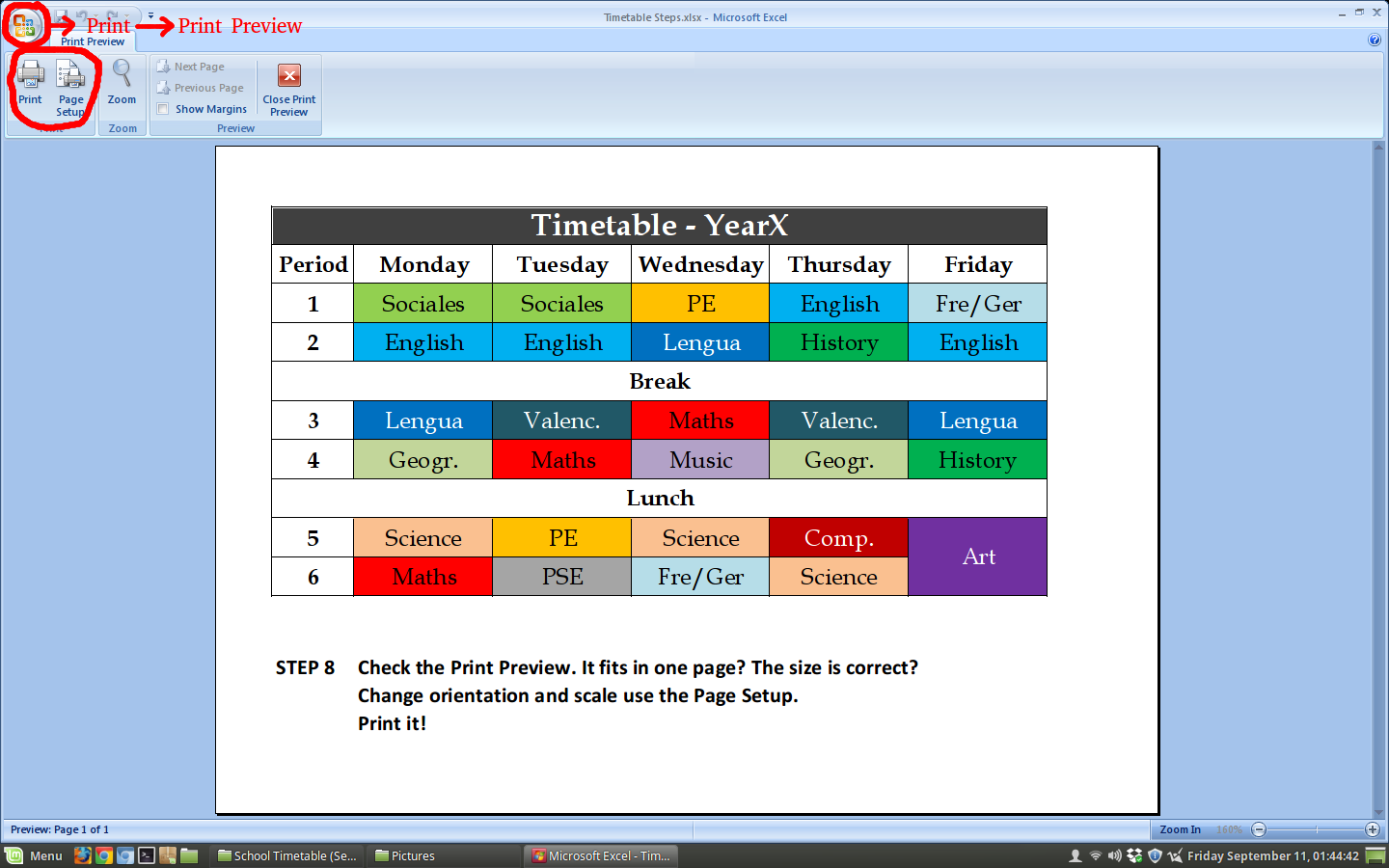
HOWTO: Create your Timetable with Excel
Step 1: Type the information.
Step 2: Center align and middle align
Step 3: Merge Cells
Step 4: Add line borders
Step 5: Resize rows and columns
Step 6: Change font style, size, etc.
Step 7: Colors
Step 8: Print Preview, Page Setup and Print!
5 Jun 2015
14 Apr 2015
Things You Love are Made With Code
Programming 2014-2015
Primary
Miss Heather Miss Sonia
Miss Helen Mr Mario
Miss Debbie Miss Susan
Mr Dennis Miss Susana Miss Penelope
Miss Alex Miss Nicci Mr Paco
Secondary
Scratch Official Website: https://scratch.mit.edu
Download Scratch 1.4: https://scratch.mit.edu/scratch_1.4/
Blockly Games: https://blockly-games.appspot.com
31 Mar 2015
Blockly Games: Learn All the Basic Programming Concepts!
Blockly Games is awesome.
It covers the basics of Block Programming, Loops, Conditionals, Coordinates, Basic AI and Javascript. Also KTurtle with blocks! All on the web.
Enough to take anyone's head thinking computationally.
Similar to Scratch but a lot simpler while diverse and challenging. Sometimes really challenging. Good as a first lesson on programming for everyone and can come in handy in many programming lessons for Year 3-6 kids. Some activities can also serve as an hour of code topic starter.
Blockly Games is not as open as Scratch where you can experiment introducing your own media.
It's just simpler, but enough to cover a lot of programming concepts with 7 Activities:
- Puzzle: Quick introduction to Blocks
- Maze: Loops and Conditionals.
- Bird: Complex Conditionals. Coordinates.
- Turtle: KTurtle with blocks! :-D
- Movie: Maths Maths Maths
- Pond: Basic AI
- JPond: Javascript AI
From now on until june all my primary and Secondary kids will be learning to Code. They don't really know much about programming so Blockly Games comes handy as it starts easy and it's diverse.
Plan for my ICT Lessons: Blockly Games both in Primary and Secondary for 1-2 lessons (40-55 min each). Then CODE.org courses 1+2 for primary KS2 (7-11 years old). Secondary is a work in progress but probably Scratch! Maybe Creative Computing. I haven't decided yet. For my smallest kids from KS1 (5-7 years old) probably I'll go Bee-Bot for some lessons and then CODE.org course 0 (for non-readers).
And Improvisation ;)
Bellow you can see some pictures of Blockly Games.
7 Activites
Puzzle: Understand Blocks
Maze: Instructions, Loops & Conditionals
Bird: Complex Conditionals and Coordinates
Turtle: KTurtle with blocks. Awesome!
Movie: Maths & Maths & Maths
Pond and JPond: AI and Javascript
Did I say I like Blockly Games? ;)
Have fun!
Lionel
3 Nov 2014
Awesome GIMP Image Editing by Fantastic Year 8 & 9 students
I have created a Padlet wall to show the world the great work you've done.
Click the link below to enter the wall and add yours!
Remember to type your name and a short description or phrase!
Subscribe to:
Posts (Atom)